Building on a background in Houdini, simulation, and procedural workflows, I am exploring their close connection to OpenUSD, Physical AI, and digital twins. I am currently learning OpenUSD composition and layering while developing a bridge between procedural Houdini environments and digital-twin simulations in NVIDIA Isaac Sim.
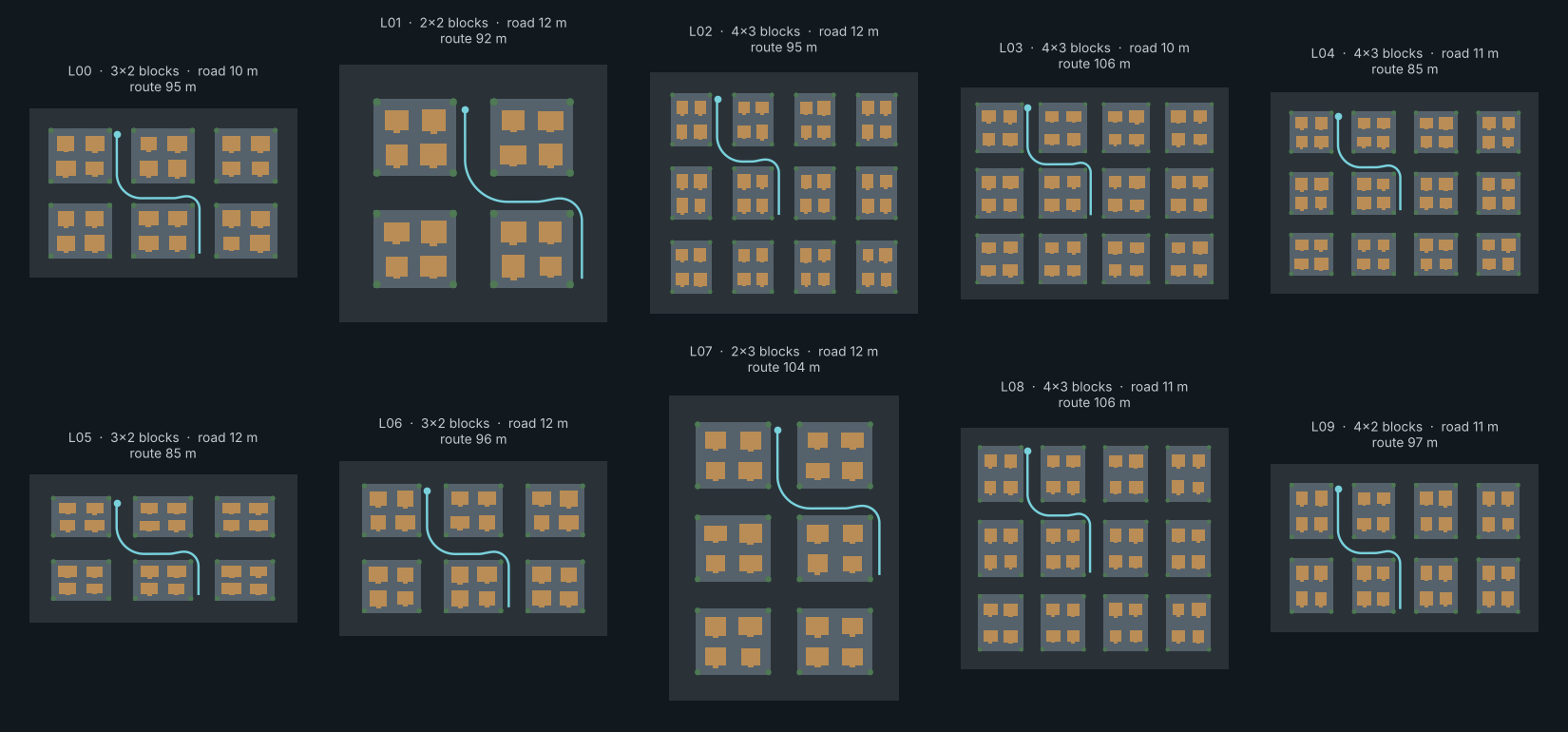
01 — Ten layouts from one HDABlock count, spacing, road and sidewalk width, building seed
Does the car still stop when the city and the timing change?
Study 02 showed one route working. This study asks how often it works. The Houdini HDA generates ten street layouts from one recorded seed, and each layout gets the same ten pedestrian crossings: different places, walking speeds, sides of the road, and moments when the person steps out.
Every run is logged and classified automatically. The first pass exposed a failure the single demo never showed, so I changed the controller and ran the same 100 cases again.
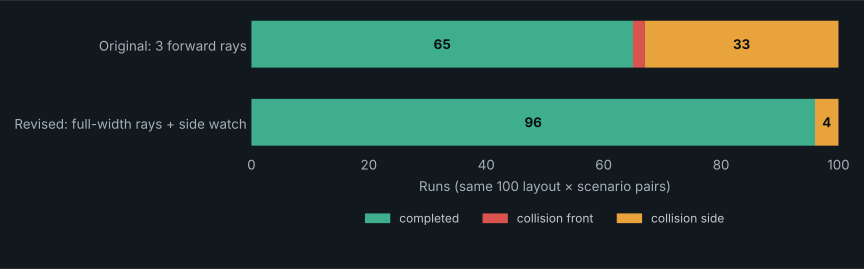
10 layouts × 10 crossing scenarios, each run under the original controller and the revised one. 95% confidence intervals for the contact-free rate: 55–74% before, 90–98% after. RTX 3080, physics at 120 Hz.
WHAT THE FIRST PASS FOUND
Fine when the crossing is clear, blind when it isn’t
Before looking at any outcome, I sorted the 100 scenarios by their timing. In 65, the pedestrian crosses clearly before or after the car. In 35, they step out just as the car arrives.
The original controller succeeded in all 65 clear cases and failed in all 35 close ones. In 33 of those failures the pedestrian walked into the side of the car. Its three forward rays only see what is already in the lane, so someone stepping off the curb is invisible until it is too late. A single successful demo can’t show this; running the same controller across many timings does.
The same 100 layout × scenario pairs under both controllers. No run in either set struck a curb, left the route, or timed out.
THE CHANGE
Watch the curb, and yield to people stepping out
01 / SEE
Look to the sides
Eight angled rays (15° to 60° each side) watch the curbs ahead. The in-path rays are widened to cover the car’s full 2.05 m width instead of the middle 1.3 m.
02 / PREDICT
Who will reach the lane first?
The nearest person within 6 m of the lane is tracked. Their sideways speed predicts when they will reach the car’s path; if that is before the car has passed, the car yields.
03 / ACT
Slow, stop, then go
Someone close to the lane but not moving toward it caps speed at 1.2 m/s. A predicted conflict is treated like an obstacle, so the existing speed controller brakes for it and resumes when it clears.
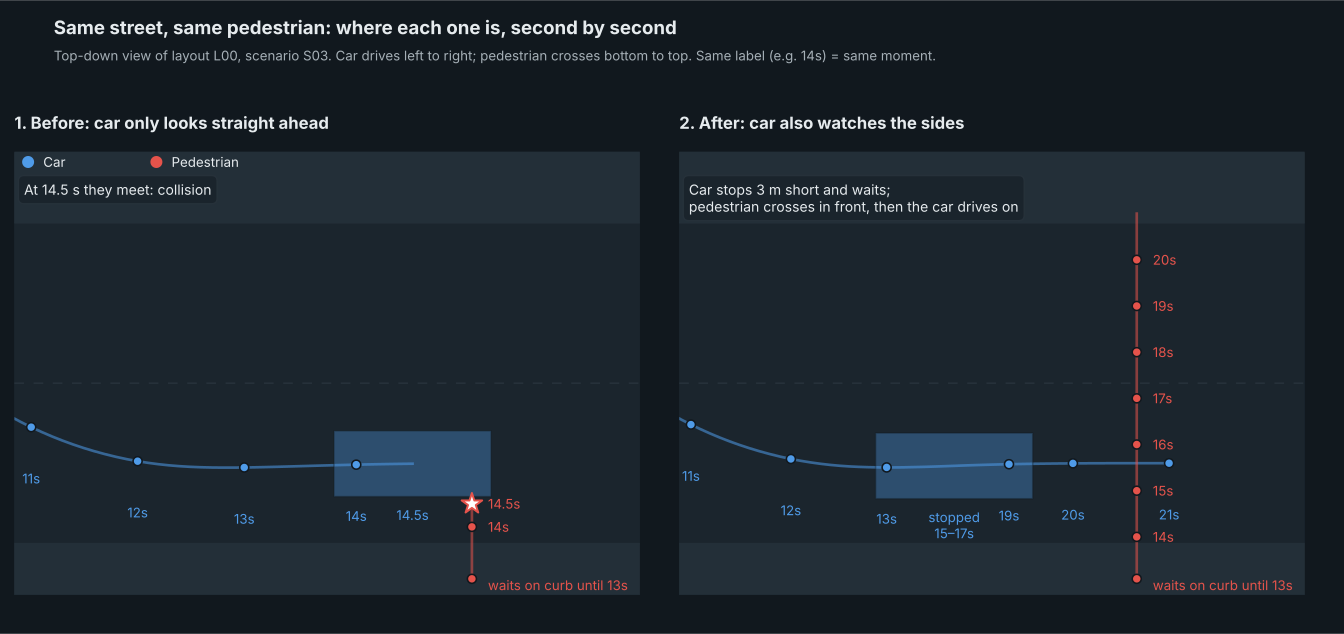
Layout L00, scenario S03, seen from above: the car (blue) drives left to right and the pedestrian (red) steps off the right curb about 5 m ahead. Matching labels show where both were at the same second. The original car keeps going and they meet at 14.5 s; the revised car stops 3 m short, waits while they cross in front of it, then drives on.
The cost is time. Across runs both versions completed, the revised car takes 34.6 s instead of 32.8 s, because it slows for people waiting at the curb. It also broke two runs that the original passed: slowing near a waiting pedestrian shifted the timing so that they walked into its side. Two late step-outs still fail under both versions.
TECHNICAL NOTES
Details
How is it run?
A seeded config defines the layouts and crossings. In Houdini, a TOP network (JSON Input and ROP Fetch) reads each layout from that config and exports it to USD. Inside the HDA, an Error SOP stops any layout whose route breaks the road rules or would put the car on a sidewalk, so nothing unchecked reaches simulation. An Isaac Sim script without a viewport runs each layout’s ten crossings as stop → reset → play cycles and writes one JSON result per run. Plain-Python unit tests cover the scenario geometry and the side-watch logic, and a simple bicycle-model mock catches logic errors before GPU time.
What counts as a failure?
Any overlap between a 2.05 × 4.90 m car rectangle and the pedestrian is a contact, labelled front (the car drove into them) or side (they walked into a passing car). Both count as failures. A run also fails if the car touches a raised sidewalk, strays more than 2 m from the route, or doesn’t finish in time.
What’s custom and what’s off the shelf?
The vehicle comes from NVIDIA’s PhysX vehicle sample (BasicSetup), and the pure-pursuit steering is the same approach as Study 02. The layout generation, scenario design, side watch, metrics, and analysis are specific to this study.
Limits
The pedestrian is a kinematic capsule walking a straight line at constant speed, and it never stops for the car. Sensing uses PhysX ray queries and the simulator’s exact car pose, not LiDAR. All ten layouts use one scaled route template. Each pair runs once because physics is deterministic. Most importantly, the revision was designed after seeing these same scenarios fail, so 96/100 is not a held-out result. The next step is a fresh scenario set from a new seed, with pedestrians who hesitate or turn back.
This is one complete run, shown at 2× speed. The PhysX vehicle follows the route exported from Houdini, stops for the NavMesh-driven pedestrian, continues through both turns, and brakes again at the route endpoint. LiDAR drives the stop-and-release logic; the camera is only used to inspect the run. I left the navigation and sensor overlays visible so the test setup can be seen.
From Houdini to a driving test.
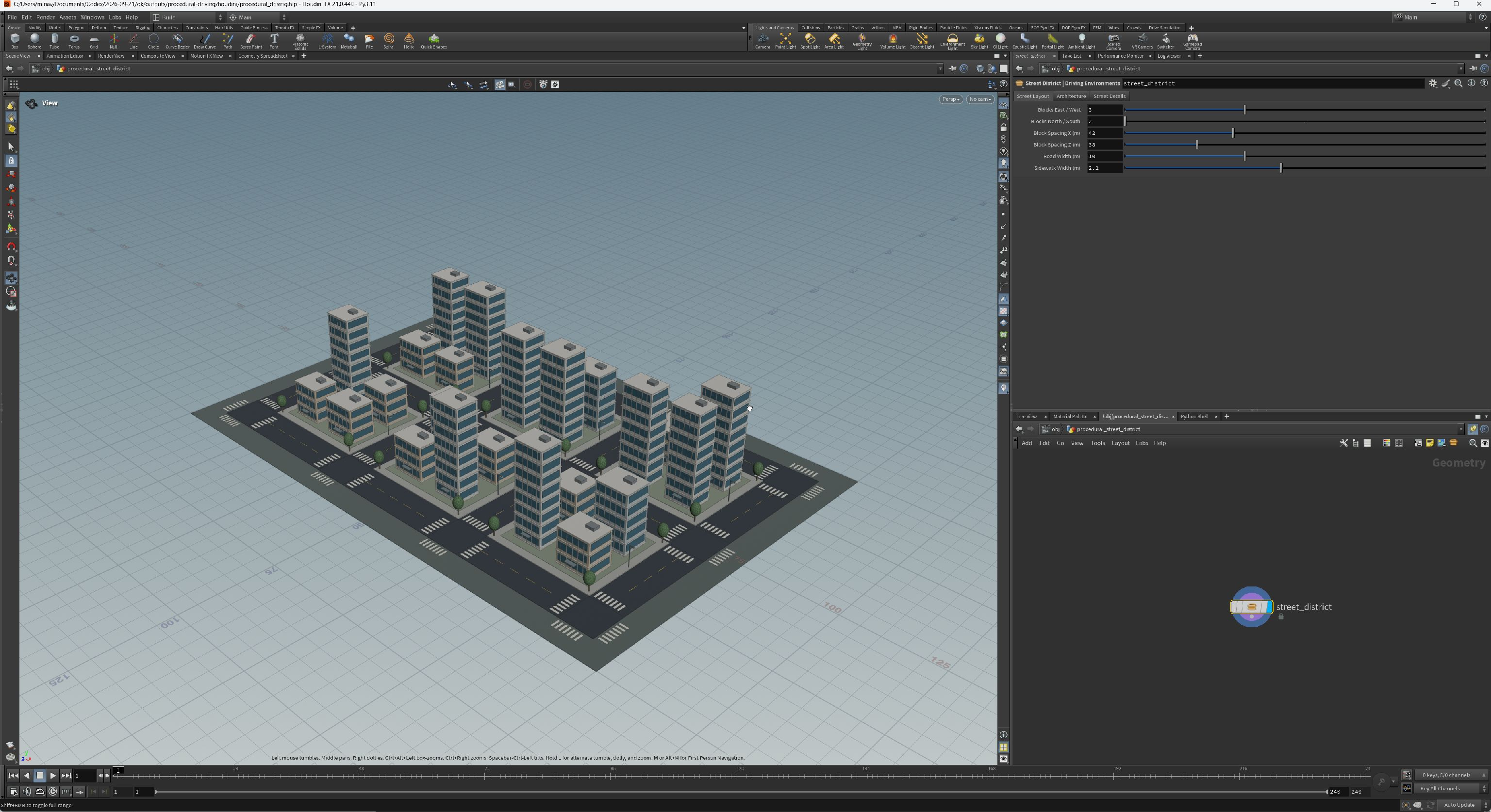
I built the street district as a Houdini Digital Asset, with controls for the road layout, buildings, and street furniture. It exports to OpenUSD and becomes the environment for a physical vehicle in Isaac Sim.
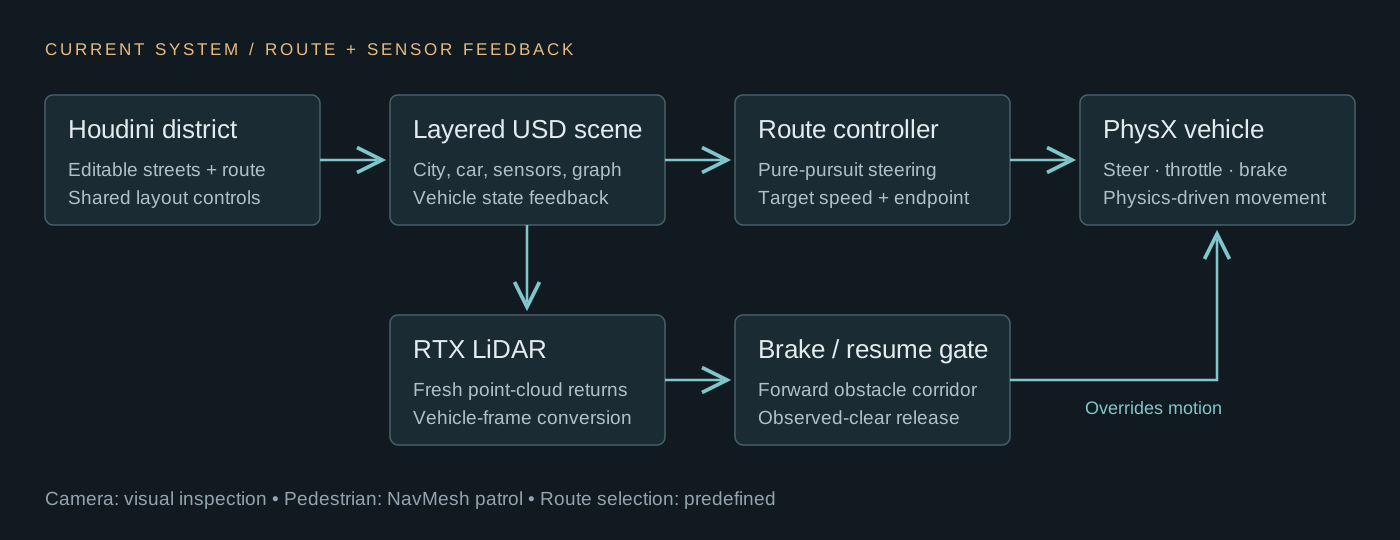
The current test combines a predefined route, a PhysX vehicle, RTX LiDAR, and a pedestrian walking on a baked NavMesh. When the pedestrian enters the car’s forward detection area, the controller applies the brake and waits for new LiDAR returns before moving again.
These are the controller settings used in the recorded run, not performance guarantees. The braking threshold also increases with vehicle speed. The crossing sequence worked in this test. Repeatability across layouts and crossing timings is measured in Study 01.
SENSING AND RESPONSE
How the car handles the crossing
For this test, the pedestrian crosses on a baked navigation surface while the vehicle approaches in its lane. The controller checks fresh LiDAR returns inside a narrow area ahead of the car and overrides the driving commands when that area is occupied.
01 / APPROACH
Follow the route
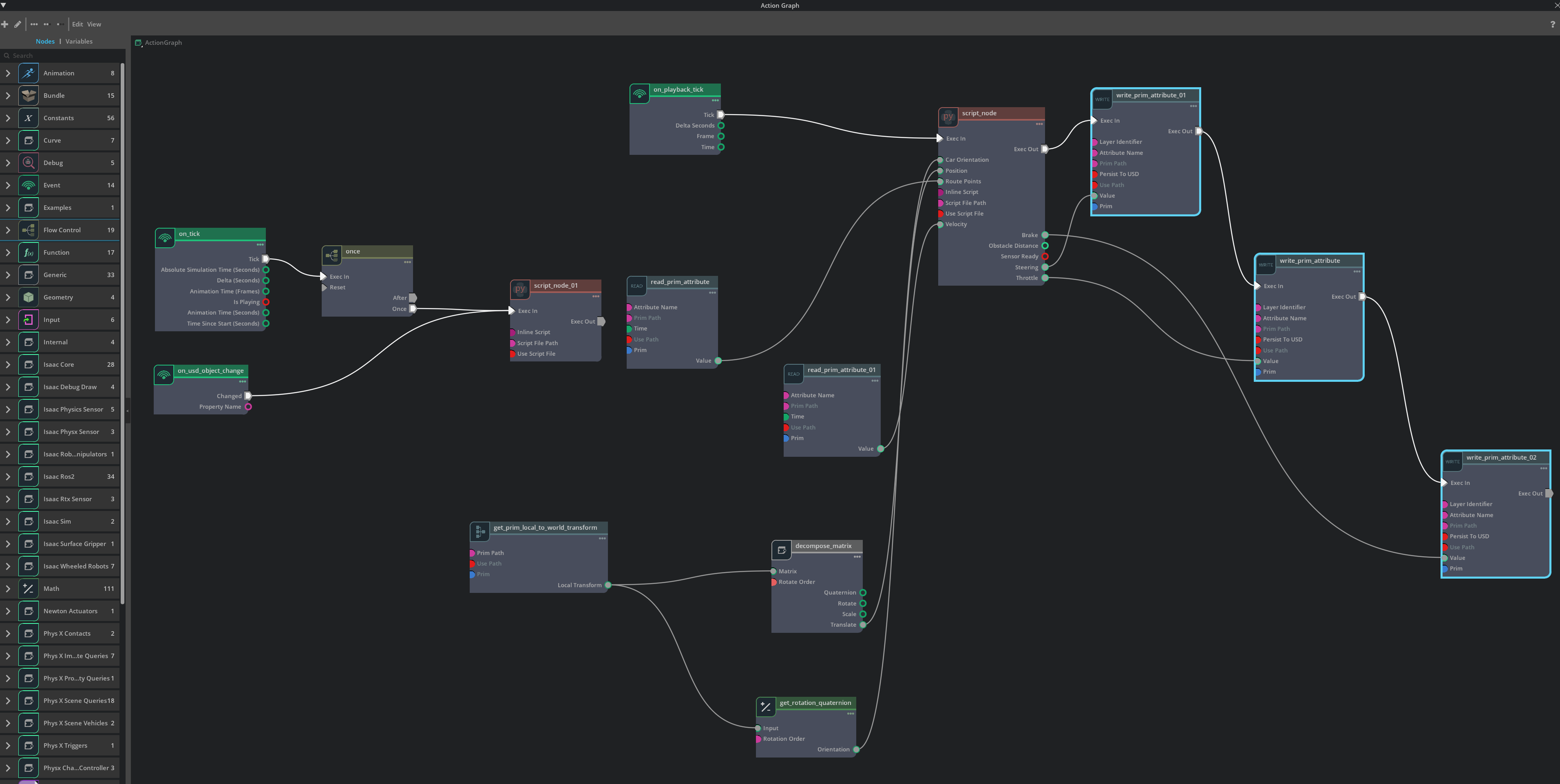
Vehicle position, orientation, and velocity feed a pure-pursuit controller. Steering, accelerator, and brake commands flow through an Action Graph into the PhysX vehicle.
02 / YIELD
Brake for occupied space
Fresh LiDAR points are checked against the route the car is about to drive. Only returns within 1.25 m of that path count, so the corridor bends with the road in turns and ignores trees and lamps beside it. The crossing test produced a full brake command and a visible stop.
03 / CONTINUE
Wait for clear evidence
The controller holds the stop while space remains blocked or uncertain. New returns beyond the previously blocked location must confirm clearance before driving resumes. The car continued after the pedestrian cleared the lane.
Controller architecture diagram. The camera currently provides a visual view; LiDAR supplies the obstacle measurements used by the braking logic.
BUILT IN HOUDINI
A district controlled by an HDA
01
Lay out the streets
The procedural layout generates the street network, raised sidewalks, block parcels, markings, and crossings. Block count, spacing, road width, and sidewalk width remain editable.
02
Vary the architecture
Three building modules combine floor bands, glazing, roof equipment, and entry canopies. Seeded variant selection and Attribute Randomize change their distribution and footprints across the generated building sites.
03
Export the cooked result
The native USD File Export node writes named geometry groups and display colors. Metres and Y-up are preserved in Isaac Sim, where static collision surfaces and vehicle physics are added.
HDA controls and the cooked district in Houdini. Select the image to inspect the interface at full resolution.
OPENUSD HANDOFF
From HDA to simulation
The HDA writes the city geometry and route points to a dedicated environment USD file. I keep the car, collision overrides, sensors, and Action Graph in a separate simulation layer. This lets me re-export the Houdini environment without rebuilding the vehicle setup. When the route changes, a reset branch reads its new starting point and direction, places the car above the road, and clears its velocity. I tested the link by changing the block spacing in Houdini and reloading the export in Isaac Sim.
ISAAC SIM / ACTION GRAPH
The driving and reset graph
The actual project graph. Route points, position, orientation, and velocity feed the driving Script Node. Its outputs command steering, throttle, and brake through three sequential Write Prim Attribute nodes. The left branch handles initial placement and route-change resets. The controller also exposes obstacle distance and sensor readiness. Select the image to inspect the full-resolution graph.
DEVELOPMENT PROCESS
What I built and tested
01 / SCENE COMPOSITION
Keep the city editable
Separate environment exports from simulation authoring. Link the road layout and route to shared Houdini controls, reload the environment layer, and reset the vehicle from the updated route instead of entering coordinates manually.
02 / PHYSICS AND FEEDBACK
Build a physical driving loop
Add static collisions to roads, sidewalks, buildings, and street furniture. Configure the vehicle chassis, wheels, suspension, and steering, then connect route and vehicle state to the driving controller.
03 / SENSOR INTEGRATION
Check what the LiDAR sees
Parent the camera and LiDAR to the vehicle and position their mounts. Inspect the point cloud, resolve sensor and vehicle coordinate frames, and filter chassis and ground returns. Stationary scans expose missed obstacles and close-range visibility limits before another driving test.
04 / PEDESTRIAN NAVIGATION
Connect both sides of the crossing
Bake a walkable NavMesh for an Actor SDG patrol. Compare a simple test surface with the exported meshes, correct winding on navigation test copies, and exclude painted markings that fragmented the walking surface. A path query then connects both sides on the same navigation island.
05 / BRAKING AND RESUME
Separate absence from clearance
Use a minimum four-metre trigger with a speed-dependent stopping margin. Hold braking through uncertain scans and require fresh evidence beyond the blocked location before release. Test the sequence with a stationary cube, then a walking pedestrian.
06 / REPEATABLE SETTINGS
Verify the active behavior
Check the pedestrian’s authored patrol speed rather than relying only on the setup panel. Existing actors retain their scene behavior when setup skips respawning them. Save the corrected behavior and reload the scene before testing the next crossing.
Current result
In the recorded crossing run, the brake output reached 1 and the car stopped before the pedestrian. It moved again after the lane cleared. The system only detects occupied space; it does not identify pedestrians, choose its own route, or represent a complete autonomous-driving stack.
TECHNICAL NOTES
Environment tools meet vehicle control
What is procedural?
The district generator is an HDA set up in Houdini, with its native SOP nodes grouped into five construction branches. The driving route starts as four points in block units, which two Transforms scale to the city and shift into the right-hand lane; two PolyBevels round the turns and a Resample spaces the points for the controller. An Error SOP blocks the export when the road is too narrow or the blocks too close, and a Ray SOP check flags any point of a car-sized footprint that would land on a sidewalk. The layout values travel with the USD as primvars. All geometry is cooked by native Houdini operators, with no Python SOPs or wrangles. Six validation cases check repeatable seeds, alternate seeds, expanded layouts, tight block dimensions, and disabled street details.
How does the car drive?
A pure-pursuit controller turns route error into steering, and a speed controller supplies throttle and braking. The current implementation uses RTX LiDAR measurements to gate these commands when the forward corridor is blocked. Native graph nodes read the vehicle state and apply the outputs of a Python Script Node. Physics determines the motion through the wheels, suspension, and tire forces. The car uses simulator pose and an exported route; independent route selection is still planned.
Scope, attribution, and next steps
The Houdini district, HDA, vehicle appearance, route controller, test setup, and analysis form this personal study. The physical vehicle is configured with NVIDIA’s PhysX vehicle tooling. The environment is fictional, with no calibrated real-world twin. The camera, RTX LiDAR, and navigation-driven pedestrian form the sensing and interaction setup. The pedestrian uses a supplied NVIDIA character asset. The camera is available for inspection but does not yet classify road users. With the pedestrian active, the scene runs well below real time on an RTX 3080 (about 3 FPS), which is why the clip is played back faster. Next steps are destination and route planning, traffic rules, and perception from sensor observations; crossing timings are now tested at scale in Study 01. The detection corridor follows the planned route on flat roads; it is a geometric filter, not a complete collision predictor.
I built this small warehouse scene to practice assembling an OpenUSD environment, controlling a robot, and measuring the result in one repeatable setup.
A Franka Panda moves a physical workpiece between marked zones. Each run records the object trajectory, robot joint positions, lift height, and placement error.
OpenUSDIsaac Sim 6.0.1PythonPhysXDifferential IK
12evaluated trials
12 / 12successful placements
11.3 mmmean placement error
3scenario variants
12 deterministic simulation trials across three pickup scenarios. Success: lift above 12 cm, final XY error below 6 cm, final height within 4 cm. These runs are a small experiment, not a production reliability estimate.
SEE IT RUN
From approach to release
Recorded in Isaac Sim. The object moves through physical contact with the gripper. The controller uses smooth waypoints and differential inverse kinematics.
THE WORKFLOW
Build. Simulate. Measure.
01
Procedural scene
Python generates the facility, safety markings, pallet stack, and storage modules. OpenUSD references and instancing keep the rack asset reusable.
02
Physical behavior
An articulated arm, collision shapes, gravity, and a dynamic workpiece form the test. A waypoint state machine drives the robot through a complete transfer.
03
Recorded evidence
Seeded scenarios vary the pickup location and lighting. Telemetry captures the actual motion, and an explicit geometric check determines success.
A personal study covering procedural scene construction, scenario setup, experiment harness, telemetry, and presentation. The robot asset and differential IK helper come from NVIDIA’s installed Isaac Sim examples. The environment is authored with Python/OpenUSD; a Houdini export is a future extension.
What counts as success?
The object must lift above 12 cm, finish within 6 cm of the target in the horizontal plane, and settle within 4 cm of the target height. Finishing the controller sequence alone does not count. The downloadable results include each trial’s final position and lift height.
Limits & next experiment
This is a fictional cell for studying digital-twin workflows. It has no calibrated physical counterpart and makes no sim-to-real claim. Control uses known object poses, rather than visual perception. No reinforcement-learning policy was trained in Isaac Lab. Study 04 below extends this foundation with camera-based sorting and visual verification.
Implementation notes
Scene generation, the saved USD stage, and the experiment harness are maintained together. The study was run in Isaac Sim 6.0.1 with the Franka asset from NVIDIA’s asset library. Per-trial results and telemetry are available below.
01 — From pixels to physical actionActual Isaac Sim render
Sorting from camera observations.
I extended the test cell with an overhead camera so the robot could locate its pickup targets from RGB images instead of using the known scene position directly. Three colored parts are sent to two receiving lanes.
After each transfer, the arm moves out of the camera view and the controller checks the destination before continuing.
3 of 3 episodes completed all three placements. Each transfer requires the correct class, a physical lift, a placement within the geometric tolerances, and camera confirmation. This is a small controlled experiment.
SEE IT RUN
Three parts. Two destinations.
Actual PhysX manipulation recorded in Isaac Sim. Three manipulation excerpts are joined together; approach, retraction, settling, sensor-acquisition pauses, and arm-parking motions are omitted. Parts remain dynamic throughout each grasp.
THE CONTROL LOOP
A decision at every step
01 / OBSERVE
Pixels to positions
HSV color segmentation finds candidate parts in the input region. A calibrated pinhole projection maps image centroids onto the known part-height plane.
02 / ACT
Class to destination
A queue assigns each detection to an available slot in its color lane. Smooth Cartesian waypoints and differential IK drive the physical grasp and transfer.
03 / VERIFY
Check before continuing
A second RGB observation looks for the matching color at the destination. Missing detections or an unconfirmed placement stop the episode.
02 — What the detector seesRGB image + computed annotations03 — The final arrangementCamera view after evaluation
TECHNICAL NOTES
A more complete experiment
What changed from study 03?
The procedural warehouse becomes a vision-guided work cell with a camera gantry, input tray, two receiving lanes, and three dynamic parts. The new work adds RGB detection, image-to-world projection, destination-slot allocation, visual feedback, and separate localization and manipulation metrics.
How are the results measured?
Three seeded conditions vary pickup layout and lighting. The controller uses image-derived pickup coordinates. Simulator object positions are read separately for reset and scoring. Success requires a lift above 12 cm, final XY error below 6 cm, final height within 4 cm, correct color classification, and visual confirmation within 6.5 cm.
Assumptions & limits
The detector assumes known part height, two distinctive colors, a fixed calibrated camera, and an unobstructed input region. It uses classical image processing. This study does not include a trained vision model, collision-aware path planner, real-robot validation, or Isaac Lab policy training.
Implementation notes
The scene generator, camera parameters, and controller share the warehouse foundation from study 03. Tested in Isaac Sim 6.0.1 using NVIDIA’s referenced Franka asset and differential IK helper. Per-transfer results and telemetry are available below.